
A Complete Guide to Instructional Design for Professional Training
The difference between training that works and training that gets forgotten.
| September 1, 2026 | Tags: Instructional Design, Instructional Design Models, Learning Science, SME Collaboration |

In this article:
Instructional design is the discipline that shapes how a training program is built, from its purpose to its structure to how it’s taught, and it’s usually what separates a program that changes performance from one that gets forgotten. Two organizations can spend the same money, pull from the same subject matter experts, and end up in completely different places: one has new hires reaching full productivity in two weeks, the other has a course nobody opens twice.
The difference is that the first organization ran the work through an actual design process: diagnosing what the job required, designing backward from that answer, and choosing a format because it fit rather than because it was familiar. The second organization skipped straight to building.
Key Takeaways
- A subject matter expert knows the material; an instructional designer knows how to turn it into something a learner can absorb. Good training happens when organizations combine those two kinds of expertise.
- Effective training programs follow a clear process: identifying the real performance problem, designing experiences that support skill development, and evaluating results with meaningful data.
- Most organizations track training completion and reaction because that's what's easy to measure. Neither one tells you whether training worked.
What Instructional Design Is
Instructional design (also sometimes called Instructional Systems Design and Learning Experience Design) is the practice of building learning experiences that change what someone can do at work. It draws on learning science, communication, and plain problem solving to look closely at what a job requires, where people struggle, and what would help them perform better.
The practical difference between instructional design and content production is the order of operations. Content production is about the material: organizing it, formatting it, making it look finished. Instructional design is about the person on the other end of it: what they can’t yet do, and what would get them there.
What Instructional Designers Do
Most of an instructional designer’s time goes into making sense of complexity. They work with subject matter experts to turn expert knowledge into something teachable (objectives that are actually measurable, content trimmed to what matters, a sequence that builds instead of just lists, and practice that mirrors the real task) then a way to check afterward whether any of it worked. Put simply, an instructional designer is accountable for whether the training results in increased capability. When organizations make instructional design part of their larger learning and development strategy, the result isn’t just better courses, it’s a system that keeps pace with what employees need to do.
Where Subject Matter Expertise Runs Out
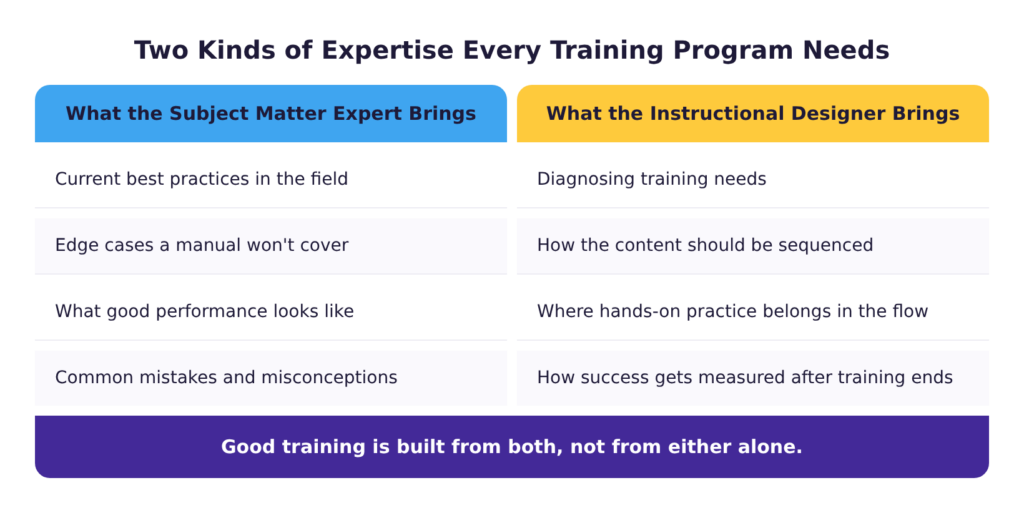
The most common reason an organization hasn’t brought in instructional design help is that the people who know the work best usually also write the training. Someone who has spent ten years running a production line knows exactly what good performance looks like.
The problem is that knowing how to do a job and knowing how to teach it are two different bodies of expertise, and being good at one doesn’t make someone good at the other. An expert can diagnose a machine fault in ten seconds without thinking about how they did it. That instinct doesn’t come with a built-in ability to sequence a lesson, decide which practice builds the skill, or notice when an explanation that makes sense to them won’t make sense to someone hearing it for the first time.
This doesn’t mean experts should stay out of training entirely. The fix is being clearer about who does which part. The problem with making experts responsible for the whole job is that it asks them to do two jobs. One they’ve spent a career on, and one they’ve never been trained in, and the training suffers for it.
Deciding Whether You Need a Designer
Not every situation needs a designer. A policy update that people need to read once, a short reference sheet, a meeting recap: none of that requires design work.
The most strategic time to bring in an instructional designer is when someone has to be able to perform a skill well, when getting it wrong is expensive, or when the same training has to work for hundreds of people. A new equipment safety procedure on a production floor, a compliance requirement with a regulator behind it, a customer-facing script for handling an escalation, a first-time-manager program, or a technical certification path all meet the criteria for projects that would benefit from an instructional designer’s expertise.
What Skipping It Costs
A common objection to bringing in an instructional designer is that it adds cost. In most cases though, skipping the instructional designer just moves the cost somewhere nobody is counting. It shows up in the retraining, the help-desk tickets, the supervisor hours spent re-explaining what the course didn’t teach, and the workaround a team invents because the official procedure doesn’t match the job.
When the design work happens, the return shows up in ordinary operating numbers rather than in training metrics. A new hire reaching full productivity in two weeks instead of six. A support team that stops fielding the same question every week because the training answered it the first time. Materials that hold up under real work instead of needing a rebuild six months later. That gap between what an organization spends on training and what it gets back is one of the things high-performing workplaces do differently.
Diagnosing the Training Need
An instructional designer starts by asking questions: what’s the performance gap, who has it, and what’s causing it? Getting those answers right determines whether the course that gets built addresses the problem or just looks like it does.
Diagnosing the Performance Problem
The first question is whether training is the answer at all. People who already know how to do something and still aren’t doing it don’t need a course. More often, the cause is something else: incentives point the other way, a process changed and nobody was made aware, the tool fights the person using it, or the job takes longer than the time allows. Working through performance systematically before designing anything prevents teams from building a course for a problem training can’t fix.
Analyzing the Training Need
Once you’ve established that training is part of the answer, the next step is to complete a training needs analysis that asks two questions: what does good performance look like and where are people falling short of it?
The goal is to create a short list of things people need to learn to do, which becomes the guide for training content moving forward. Instructional designers use this list to keep the scope of training in check. Anything that doesn’t link to an item on the list is likely something that the training doesn’t need to include.
Mapping Capability Against Roles
For anything larger than one course, the analysis needs a picture of the whole role, not just one function within it. A skills gap analysis identifies the capabilities a role depends on and marks which ones are covered and which aren’t. This turns a vague sense that “onboarding is weak” into a specific list of things a new hire can’t do yet.
When a role has several distinct skill sets, or an organization is tracking this across many roles, a skills matrix or competency matrix lays out which employees have which capabilities and where the gaps sit. That’s what turns “we should probably train on this” into a specific list of who needs what.
Knowing Who You Are Designing For
The same content lands differently depending on who receives it. Three things about an audience change design decisions more than anything else does:
Motivation changes what a course can ask of someone. A supervisor-track leadership program can expect pre-work and a written reflection afterward, because the learner chose to be there. The fourth annual run of the same compliance refresher can’t. Low motivation doesn’t mean training has to be shorter though. Instructional designers use techniques like storytelling or a strong opening hook to increase buy-in.
Prior knowledge varies significantly between learners, even among people in the same role. Writing down two or three short sketches of real learners helps designers build training that works for everyone: the distribution center picker in month one who doesn’t know the warehouse layout yet, and the lead with six years in who wants the exception handling and nothing else.
The environment a course gets taken in sets hard limits on what the course can be. A hospital unit with twelve minutes between rounds can’t use a forty-minute module. A loud plant floor means narration-only content is unusable without captions. A field crew has phones, not laptops, so any digital learning has to work on a small screen. Where a course will be opened determines things like how long it runs and what screen to build for before a single objective gets written.
Designing for How Adults Learn
An instructional designer is an expert in how adults learn, the same way a classroom teacher is an expert in how children learn, and the two aren’t interchangeable. Many organizations default to teaching models built for a classroom of kids, not a room of employees with jobs, deadlines, and years of prior experience already shaping what they’ll accept. Treating the two the same way is where a lot of training goes wrong before it even starts.
What Adults Bring to Training
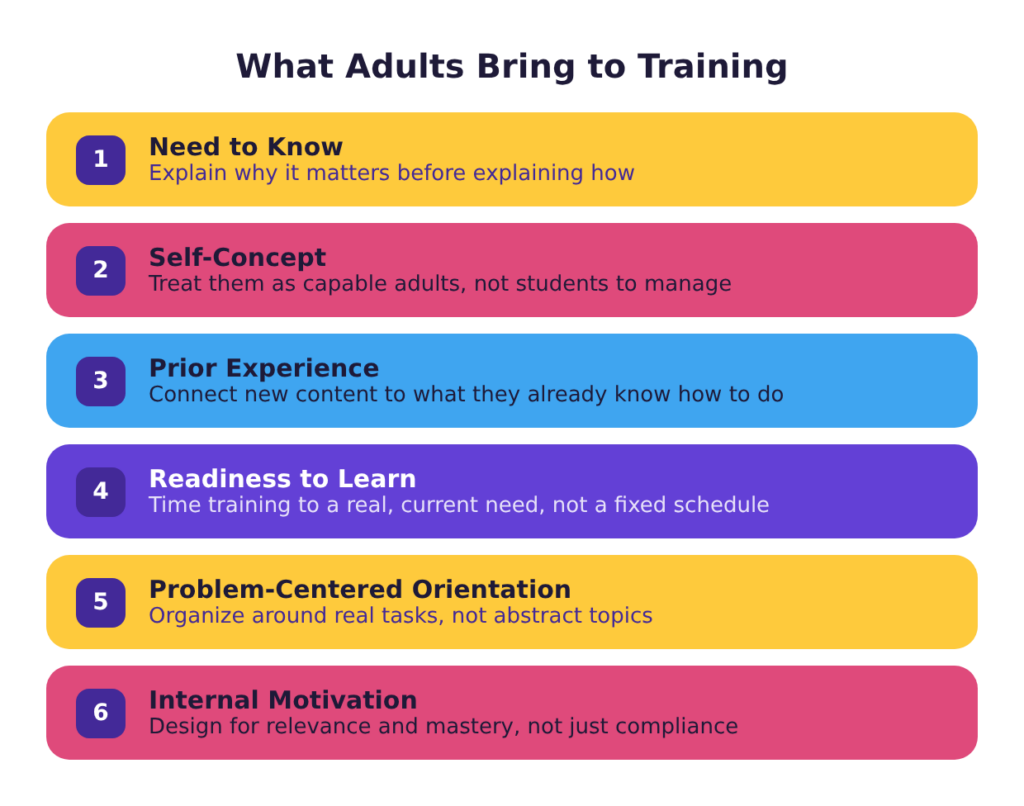
Adults come to training with prior experience, limited patience for material they can’t place, and a job waiting for them when it ends. Adult learning theory describes what follows from that: adults want to know why they’re learning something before they invest in it, they bring experience worth building on rather than working around, and they engage with problems more readily than with topics.
The practical consequence is that a workplace course opening with an agenda slide has already spent its first minute on the least interesting thing in it. Opening with a situation the learner recognizes gains attention and builds buy-in from the jump.
Designing for Learner Variability
Adult learning theory describes what’s broadly true of how adults learn. Universal design for learning starts from the fact that even within that, people still differ. Some read a job aid and get it immediately, others need to watch someone do it first.
In workplace training this usually means offering more than one route through the same material. It takes a little more time upfront, but it can save a manager from having to teach the same skill to each new report individually.
The Limits of Working Memory
While most people understand intuitively that learners can only take in so much at once, that understanding rarely shows up in how training gets designed. The solution organizations usually reach for is more frequent breaks. But a learner can follow every individual sentence and still finish it unable to do anything.
People can hold only a few new things at once. This caps how much a course can responsibly cover before it needs a break, a module boundary, or a separate session entirely. An instructional designer’s job is to scope and chunk the course around that limit: deciding how many objectives one session can carry, where the natural breakpoints in a process fall, and what gets cut or moved to a follow-up rather than crammed into the first one.
Retrieval and Spacing
A well-designed course should result in a learner walking away with a new skill. However, retaining that skill is a different thing. Instructional designers employ retrieval practice and spaced repetition to help training participants continue to access and maintain a learned skill over time. This works best when participants continue practicing applying the skill actively, rather than passively consuming repeat content again.
For example, a quarterly refresher that asks a technician to name the lockout steps from memory does more for retention than a module that lists them a second time. This matters most for skills that are important to know but are not used in daily work. People tend to forget these capabilities first if a one-time training opportunity is the only place they encounter them.
Multimedia Design
Multimedia design comes into play when training combines several formats at once (text, images, narration, video, etc.) to teach one idea. The goal is combining those formats deliberately so a learner takes in more and works less to decode what’s in front of them. In workplace training this usually shows up as subtraction: cutting a stock photo that’s just there to break up text, matching narration to what’s on screen instead of paraphrasing it, and replacing a generic graphic with one that actually shows the process being taught.
Adjusting to the Individual Learner
Workplace training used to mean one-size-fits-all: everyone got the same course regardless of what they already knew. Adaptive learning changes that. It adjusts pacing or content based on how a specific learner is performing, so someone who already knows the material can skip ahead and someone struggling gets another pass.
It’s not necessary in all cases. It’s most useful when the audience varies widely and the population is large, for example a sales force spanning brand-new reps and fifteen-year veterans taking the same product training. For a group of twenty who all started last month, it’s usually not worth the extra effort.
Building Accessible Experiences
For training built to be taken online, accessibility isn’t optional. A screen reader has to be able to read it, captions have to be there for someone who can’t hear the narration, and every interaction has to work without a mouse. Much of that is also a legal obligation, not just good practice.
An instructional designer builds this in from the start rather than retrofitting it later, which is usually far more expensive. Building accessible eLearning is its own body of practice and is the difference between training that reaches everyone and training that excludes part of the workforce.
Designing the Course
Once the skills and needs are clear, the next step is designing the course itself. This is where the instructional designer and the subject matter expert work most closely together: the SME confirms what’s true and what matters most, while the instructional designer turns that into objectives, an order that makes sense, and practice that builds the skill rather than just describing it.
Writing Objectives the Build Can Follow
An objective describes what someone will be able to do, specific enough that you could watch them do it. Most training documents contain something that looks like an objective but isn’t (usually a list of topics with the words “understand” or “be aware of” attached.)
Objectives are what the rest of the build follows: content, practice, and the assessment all trace back to what the objective asked for. Writing objectives well is worth the extra time up front, since a vague one throws off everything built on top of it. Bloom’s Taxonomy is a helpful tool for thinking more critically about objectives. The framework moves from recalling information up through analyzing, evaluating, and creating. If employees only need to recognize a policy, the objective is easy and the training is short. If they need to troubleshoot a system or make a judgment call, it sits higher on the taxonomy, and the training needs practice built in to match.
Sequencing Learning
A course rarely has only one objective. Once there are several, the instructional designer has to decide what order they go in and what each one can assume the learner already knows.
A forklift course that teaches the pre-shift inspection before the load chart works because the inspection is the first thing an operator does. The reverse order covers the same content and leaves the learner to assemble the sequence themselves. For something as long as onboarding, where a person moves through many courses over weeks or months, the same logic has to work at a larger scale. Mapping the path a learner takes through every course ensures each one builds on the foundation the last one set, rather than repeating it or assuming ground the course hasn’t covered yet
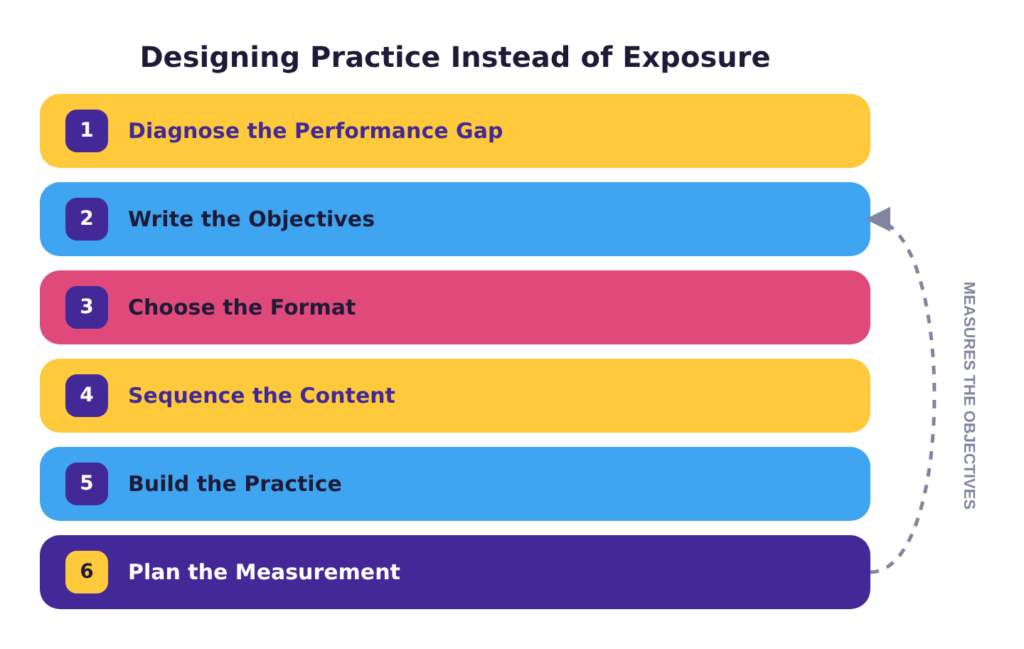
Designing Practice Instead of Exposure
The most valuable thing a course can offer is a safe place to get something wrong. This is where a well-designed training diverges most obviously from a less effective one. A compliance module that states the rule and quizzes the rule produces people who can recite the rule. A module that drops someone into a situation where the rule is inconvenient, lets them choose, and shows what follows produces people who apply it under pressure.
Scenario-based learning offers learners a chance to make a mistake and learn from it, instead of getting it wrong on the job. Building a strong scenario takes collaboration between the instructional designer and the subject matter expert. The ID knows how to structure the decision points, and the SME knows what happens when someone chooses wrong.
Getting Feedback Right
Practice only does its job with feedback attached, and the feedback has to arrive while the learner still remembers what they chose. But not all feedback is doing the same job. A quiz that reports a score at the end tells someone whether they remembered something (recall feedback), and mostly useless on its own. A scenario that shows what happens after a choice tells someone whether they can apply it is closer to the feedback they’d get from actually doing the job, but without the real-world cost of getting it wrong.
The harder version of this is transfer: designing for what happens after the course closes. That usually means building in a chance to use the skill for real and get feedback on how it went. For a new claims processor, that might look like ten practice files inside an eLearning module, followed by a first week handling live ones with a senior processor reviewing the work.
Choosing the Right Training Format
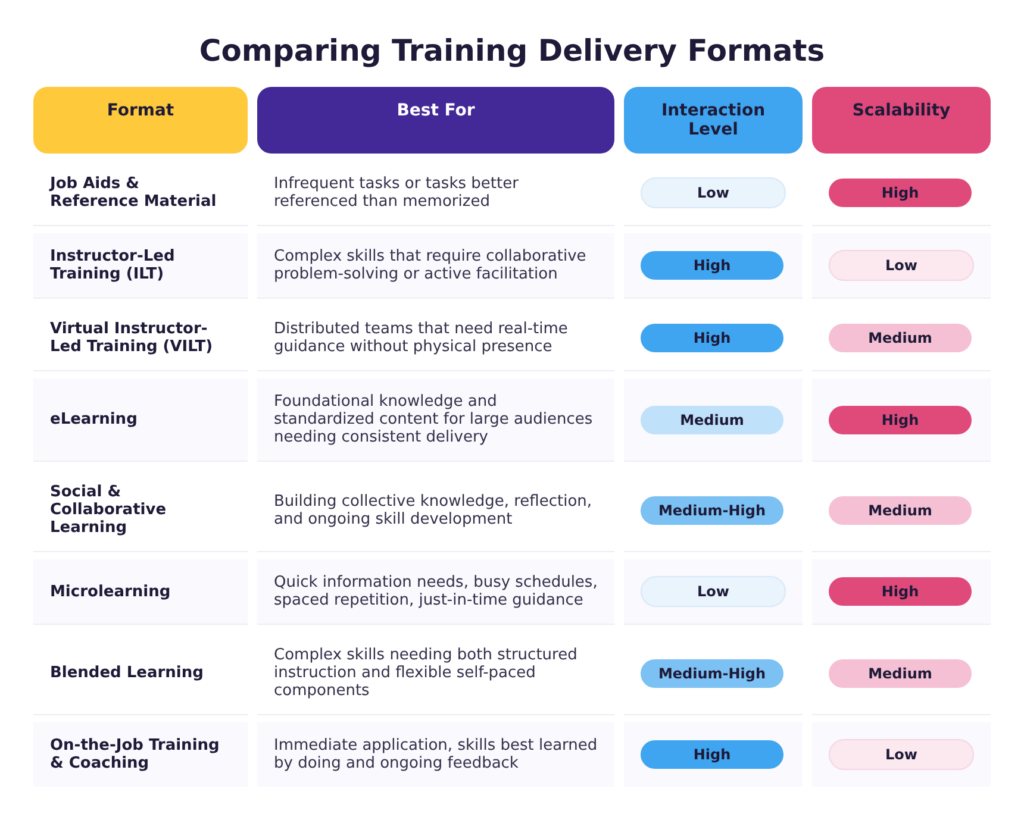
With objectives set, the material sequenced, and practice and feedback built in, one decision is still open: what form should this take? The right format depends on what someone has to do on the job, and under what conditions.
A useful way to run the decision is from lightest to heaviest. Start at the cheapest thing that could work and move up only when the requirement forces it. Most organizations do this backward, starting from a course because a course is what people request.
- Job aids beat a course for anything people look up rather than memorize. A checklist, a decision tree, a one-page reference pulled up in the moment costs a fraction of a course to build and maintain, and it reaches the learner at the point they need it instead of asking them to recall a module from six weeks ago. Reach for a job aid when the goal is accurate performance in the moment rather than understanding that has to carry over.
- Microlearning strips a single idea down to a few minutes: a one-question refresher on a revised return policy, a sixty-second video on a changed safety step. It fits where the need shows up on a phone between tasks, and it works both for reinforcing something a learner already partly knows and for adding a new skill that builds on knowledge they already have.
- eLearning provides scale and consistency. A warehouse network onboarding two hundred people a month can’t put a trainer in front of each of them, but it can guarantee everyone gets the same forklift-safety module delivered the same way. eLearning is the right call for foundational knowledge and standardized content that doesn’t change often.
- Social and collaborative learning works when expertise is spread across a team rather than concentrated in one instructor. Peer learningoften happens naturally within the workplace, but organizations can build more formal avenues to support it. A discussion board where store managers compare how they handled a difficult return, or a community of practice among maintenance techs troubleshooting the same equipment, surfaces knowledge a formal course would never capture.
- On-the-job training and coaching means learning a skill by doing it, with an experienced person correcting you in real time: a new machine operator learns the safety lockout procedure standing at the machine, with an experienced operator correcting them as they go. It can follow a more formal training experience, like eLearning, or stand on its own. Either way, it’s how a skill gets built when it has to be performed correctly under real conditions.
- Live virtual training keeps live facilitation but eliminates the hassle of travel. A facilitator can run the same escalation scenario with reps across five call centers, using breakout rooms for small-group practice instead of pulling everyone into one building. It’s a good option when the content needs a person guiding it but the learners are too spread out for that person to be in the room.
- Instructor-led training is best when the skill is one a screen can’t teach: a new supervisor practicing a difficult conversation, a service team running escalation scenarios where a facilitator can pause the role-play and correct it before it becomes a habit. That real-time correction is what a classroom does better than anything else, and the price is scheduling and travel.
- Blended learning is how most real programs end up working. A new-hire program might pair a self-paced module with practice on the floor and a coaching check-in two weeks later. It’s the right call when no single format can make a learner proficient at the skill on its own.
Format choice is one piece of building a balanced workplace training program, not a decision made in isolation. A program that’s entirely formal courses has the same problem as one that’s entirely on-the-job coaching: it only supports the part of learning it was built for.
Choosing an Instructional Design Model
Objectives, sequencing, and practice with feedback are the pieces of any course. A model is what turns those pieces into a repeatable process: the same decisions, organized so nothing gets skipped and stakeholders can follow along.
The ADDIE model runs five phases in order, analysis through evaluation, each one signed off before the next begins. It’s ideal when a project needs predictable milestones and a paper trail, which is why compliance courses with legal review tend to land here.
The successive approximation model, or SAM, takes the opposite bet: short cycles of rough draft, feedback, and revision. It’s best when nobody is sure yet what the training should look like, since a rough prototype can clarify the direction faster than more planning would.
Dick and Carey is the model to use when the objectives, the assessment, and the instruction all have to line up exactly. Its ten steps keep what you measure tied to what you taught, which matters when a regulator or a client requires solid data.
The Kemp design model trades that rigor for flexibility. Its nine elements aren’t meant to run in order, so a project can start wherever it needs to and revisit pieces as information arrives. A good fit when goals or stakeholder input keep changing.
Gagné’s Nine Events work at the scale of a single lesson rather than a whole project, sequencing what happens inside it from gaining attention through retention and transfer. Used well, the checklist helps teams build lessons that actually match how adults learn.
Merrill’s First Principles of Instruction put a real task at the center and build outward: show it done, let the learner try, then support them applying it somewhere new. It’s a good option when the goal is building a skill, not just delivering information.
Design thinking isn’t an instructional design model at all, though it gets borrowed as one. Its five stages run from empathy through testing a prototype, and it’s worth reaching for when the problem itself is still unclear and the team still needs to understand the learner better before designing anything.
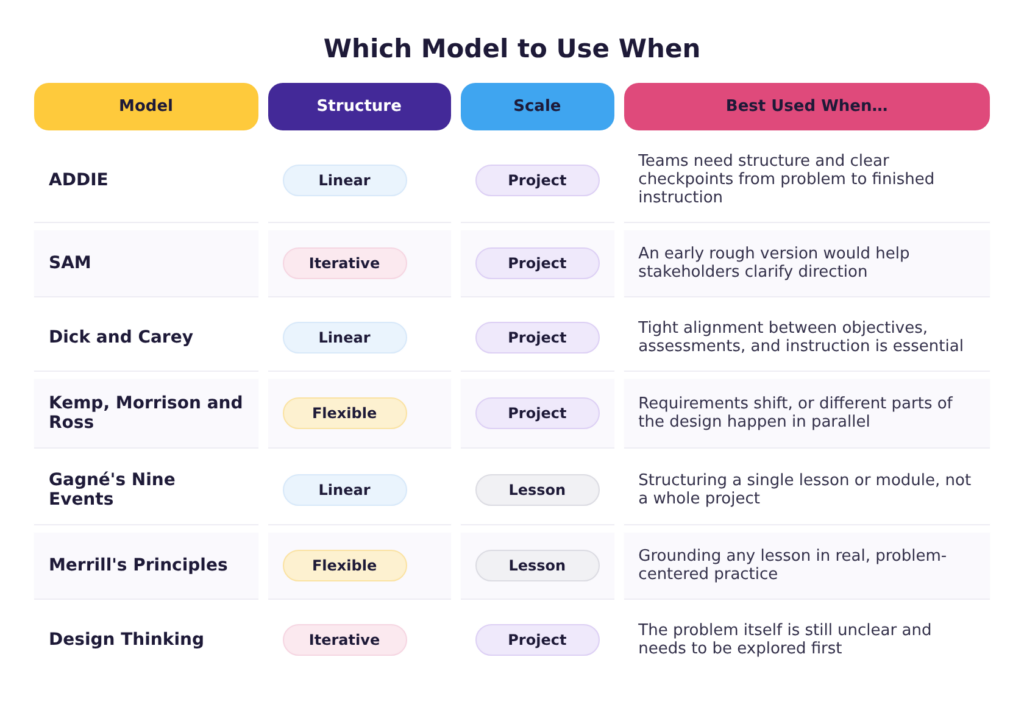
Which Model to Use When
Most organizations don’t need to choose one model forever. A team can run a compliance rebuild on ADDIE and a new product launch on SAM in the same quarter, because the two projects carry different amounts of certainty. Comparing the models against each other is usually more useful than committing to just one and is usually what experienced designers do.
Measuring Whether Training Worked
Every instructional design model includes some form of evaluation, but naming the step isn’t the same as knowing what to measure. Organizations often track completion and whether participants found the training helpful and stop there. This leaves them without the data that would tell them whether training actually worked.
Planning Measurement Before the Build
Measurement needs a plan before the training gets built, not after it launches. If the goal is average handle time on billing calls dropping by ninety seconds within a quarter, deciding that in week one gives the design something to aim at.
A measurement plan names what gets measured, who pulls it, when, and what number would count as working. Skipping that plan is behind most of the common mistakes in measuring training.
Choosing an Evaluation Model
Evaluation models give you a shape for the data you’re collecting. The Kirkpatrick model is the most widely used, looking at four levels of impact: how learners reacted, what they learned, what they did differently, and what changed in the business. The Learning-Transfer Evaluation Model, or LTEM, was built as a more demanding alternative, pushing past knowledge checks toward evidence that people can perform.
The easiest levels to measure are the ones that tell you least. Will Thalheimer, who developed LTEM, reviewed four meta-analyses spanning over 200 studies and found the correlation between how much learners liked a course and how much they actually learned averages about 10% which is, as he explains it, “virtually no correlation at all.” In other words, everyone who took a course can rate it highly, and the course can still teach almost nothing.
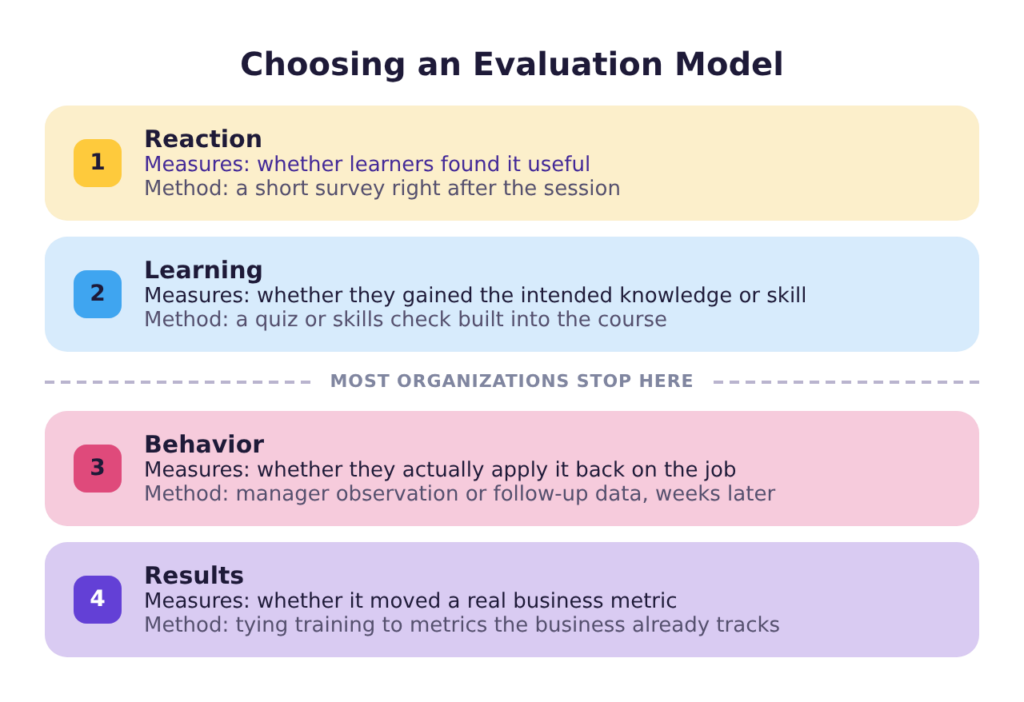
Gathering the Data
Once you know the data you need to collect, the next step is to determine the method. Surveys capture reactions, relevance, and confidence. It’s easy data to gather, but also the least revealing. Assessments, whether a scored scenario or a graded attempt at the real task, confirm whether someone can actually do what the objectives asked. Manager observation and a structured check-in catch what a quiz can’t: whether the person applies what they’ve learned once they’re back on the job. Performance data (error rates, rework, time to competence) shows whether the skill is changing outcomes, using numbers the business already tracks. Depending on your learning platform, some of this data can be gathered automatically as people interact with the training materials. Other data will have to have an alternate measurement plan in place.
Completion rates don’t belong on this list at all. The only thing they show is that a person opened a module and reached the end of it but nothing about how the experience changed their skills or performance. Of the methods that do reveal something, manager observation is often worth prioritizing over the others. It doesn’t require the tracking systems performance data depends on. A manager can simply compare what they see before and after training to judge whether capability changed. And unlike a quiz, it catches someone who knows the right answer but still does the job the old way.
Using the Data to Improve
Data that never gets used isn’t worth collecting. The point of measuring isn’t to confirm a program worked and file the result. It’s to find out what to change before running it again. Sometimes what the data shows is obvious like a module people stalled on or a practice activity nobody finished. The harder case is people finishing the course, passing the assessment, but their performance on the job doesn’t improve.
That’s the most useful signal of the three, because it means something in the design isn’t working and it’s worth going back to find out what. Either way, content, pacing, and practice get revised based on what the data showed, not a hunch.
Reporting to Leadership
Collecting the right data is only half the job. Someone still has to take it to the people who approve the budget. Making the case to leadership that instructional design matters comes down to the numbers. Being able to tie training to improvements in key performance indicators is the most powerful way to prove that well-designed training offers returns that outpace its cost. Some programs are worth a fuller Return on Investment (ROI) calculation than others. The more a program costs to build, the more necessary it becomes to demonstrate the returns.
Getting the Work Done
While every training can benefit from the involvement of an instructional designer, not every organization needs to keep one on staff. When a business wants to improve its learning and development program, there are three main options for sourcing instructional design expertise.
Where the Capability Comes From
Hiring in-house makes sense when the work is continuous and specific to your own processes, tools and customers. The person learns the business and builds more effective training materials over time, with less support needed from subject matter experts. The most common reason organizations don’t have internal instructional designers is because there aren’t enough training projects to warrant one.
Contracting a designer per project makes sense for an organization with occasional needs and a dedicated subject matter expert to oversee the work. That second condition is often the one that becomes a challenge. A contract designer has to be told what good performance looks like and who the audience is, and if there is nobody to support the designer with those questions, the product won’t hit the mark.
Partnering with an instructional design consultancy is the middle ground between the two. A consultant is an external contractor who works with your team across all learning and development tasks, from reviewing the full training ecosystem to developing new training materials. They get to know the business, the learners, and the expectations, but they don’t need a permanent place on the payroll. They develop processes, templates, and quality standards that work for your organization. That foundation lets them scale up or down as the work demands, while still working like people who know the organization rather than an outside vendor being onboarded from zero each time.
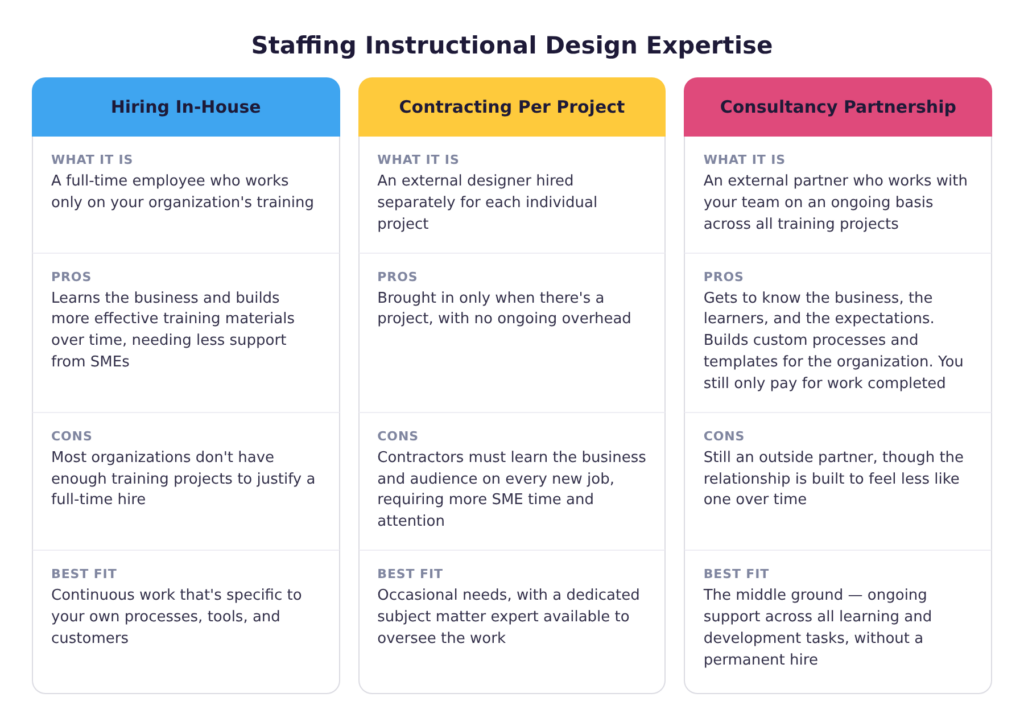
Final Thoughts
Two organizations can spend the same money and pull from the same experts and still end up with completely different results. What separates them is how well they handled instructional design: a short sequence of decisions about whether training was the answer, what the work required of their people, which format that pointed to, and how anyone would know afterward. None of them is expensive. Skipping them is what produces the course people sit through once and forget.
If you’re ready to see how instructional design can strengthen your training, browse our Instructional Design Services or set up a free consultation to get tailored recommendations for your team.