
Learning Technology: Which Platforms Your Organization Actually Needs
An LMS, an LXP, and an LRS solve different problems
| September 15, 2026 | eLearning Development, Learning Platforms, SCORM/xAPI |

In this article:
A 300-person insurance brokerage bought an LMS four years ago so every producer could prove they’d finished annual compliance training on time, and it still does that job well. But when the VP of Sales wants new hires to browse product walkthroughs whenever they need them instead of sitting through an assigned course, the learning technology behind the system can’t do it.
Learning technology tends to be the part of a training program that nobody thinks about until it can’t do what’s being asked of it. Most organizations think as far as “we need a system” and stop there, without realizing how many different kinds exist or how much the one they pick determines what a training program can actually do later.
Key Takeaways
- An LMS assigns training and proves completion, an LXP curates and recommends, and an LRS collects records of learning that happens anywhere. Most organizations already run one of these, usually an LMS, without knowing the other two exist or what they'd add.
- SCORM and xAPI are the standards that let a platform launch and track content. SCORM only tracks what happens inside a course launched from the platform, while xAPI records activity outside it too.
- A platform that can't exchange accounts and completion data with the systems an organization already runs looks fine in every vendor demo, then turns into a standing reconciliation job. Testing integration early is key.
Learning Platforms vs. File Storage
It’s a fair question for anyone new to this: why not just put the training on SharePoint, Google Drive, or Dropbox? Those tools are essential to any organization, but storing a file is a different job than managing who’s supposed to see it, whether they finished it, and what happens next. A file repository can hold a video, but it can’t assign it to specific people, save a learner’s place halfway through, or pass a quiz score back to a manager.
Most organizations have already found their way past that limit, usually by buying a Learning Management System (LMS) to assign content and prove completion. What often goes unexamined is that assigning courses and proving completion is only one ceiling on what a program can do. Curating content people pull on their own timeline is a different one, and capturing learning that happens outside any course entirely is a third. Which ceiling an organization is working under depends on the type of system in place, not just whether one exists.
LMS, LXP, and LRS: What Each One Does
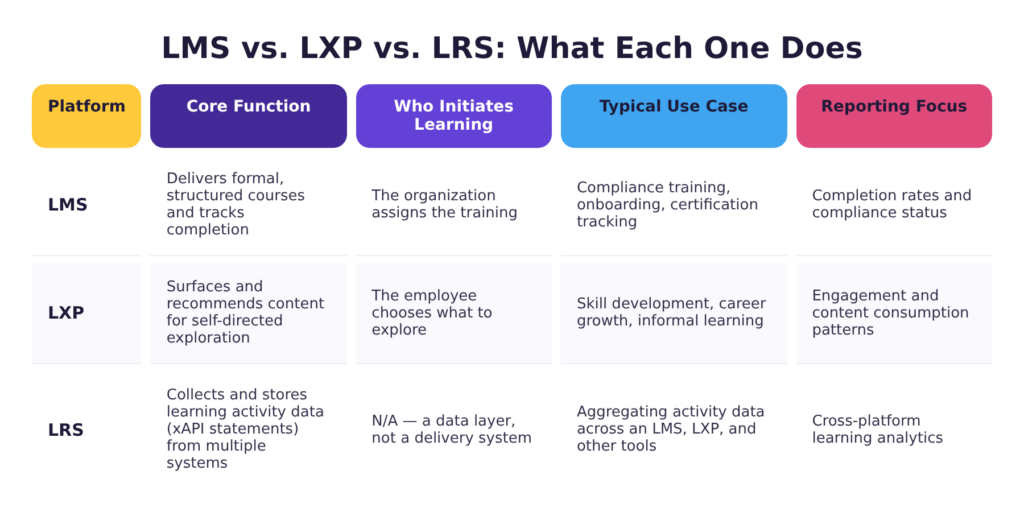
Vendor pitches use LMS, LXP, and LRS almost interchangeably, but they solve three different problems.
A Learning Management System (LMS) centers on structure and proof. It assigns required courses, enforces due dates, and records who finished what and when. It’s a good fit for an organization like a hospital that needs to show that every nurse completed annual HIPAA training by a specific date.
A Learning Experience Platform (LXP) works the other way around. It curates and recommends, closer to how a streaming service suggests something a viewer might like, so employees pull content on their own timeline rather than having it assigned to them. A distribution company might use one so warehouse leads can browse short modules on forklift certifications or new equipment as they come up, without anyone assigning them anything.
A Learning Record Store (LRS) is a database, not a delivery platform. It collects records of learning activity from anywhere it happens: a course in the LMS, a simulation, a mobile app, a task completed on the shop floor. That’s the whole point of an LRS: it doesn’t care where the learning happened, only that something records it.
Content Standards: SCORM and xAPI
All learning platforms use specific technical standards that allow the system to launch, track, and report data correctly. They work as a shared technical language that lets the courses and the platform talk to each other.
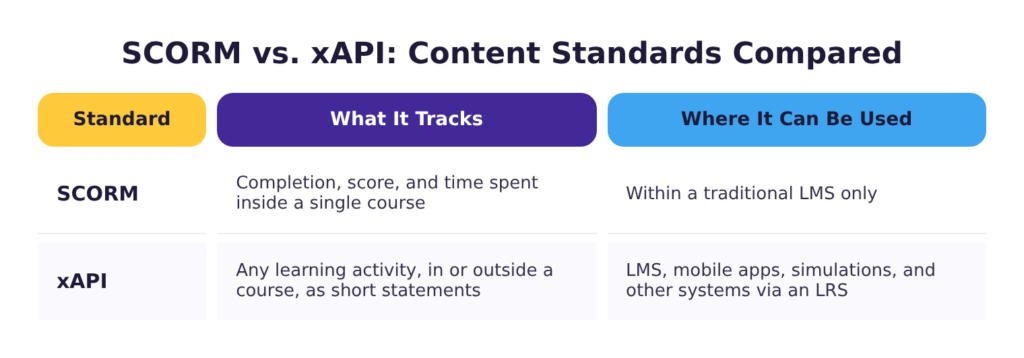
SCORM has been that language for most of the eLearning industry’s history. Nearly every LMS and course-building tool on the market builds it in, which is how it became the default. A SCORM course is built so an LMS knows how to open it and how to keep track of three things while the learner takes it: whether they’ve completed it, what score to record, and where they left off if they exit halfway through. Once the learner closes the course, that tracking stops until they open it again.
xAPI, sometimes called the Experience API, is the standard that makes an LRS possible in the first place. SCORM only tracks what happens inside a course launched from a learning platform, because that’s the only place it was built to look. xAPI works differently: it records each piece of activity as a short statement, like “Maria completed Module 3” or “Devon practiced the safety checklist,” so systems that were never designed to talk to each other can still report to the same place.
Choosing between the two comes down to what you need from reporting: SCORM is enough if your reporting only needs to answer whether someone finished the course. If leadership wants to know whether training changed what happens on the job, that calls for xAPI and somewhere for that data to land.
What Does Your Organization Need?
Platform choice is one piece of developing a learning and development strategy. Most organizations don’t need all three systems. Which ones make sense depends on how learning happens across the organization and what they need to capture about it.
Compliance requirements, safety certifications, and role-based onboarding all share the same qualities: specific people have to complete specific content by a specific date, and someone has to be able to prove it happened. That’s what an LMS is built for, and for most organizations it’s the first and sometimes only platform required. It answers who finished what and when.
Employees who build skills nobody assigned them need something different. When people are pursuing development on their own timeline, an assignment-driven system works against them. An LXP fits instead: it curates and recommends. It only earns its keep when there’s enough content worth curating, employees will pull learning without being told to, and someone owns curation as a responsibility. Without those three conditions, it tends to sit unused.
Learning that leaves a trail across several systems that don’t talk to each other, such as simulations, mobile tools, coaching sessions, and courses, is the cue for an LRS. It’s the platform to reach for if leadership wants to know whether training changed behavior or moved a business metric, not just whether people finished a course. An LRS only helps once there’s something worth pulling together; a single system with no outside activity to track has nothing for it to do.
How to Evaluate Learning Technology Before You Buy
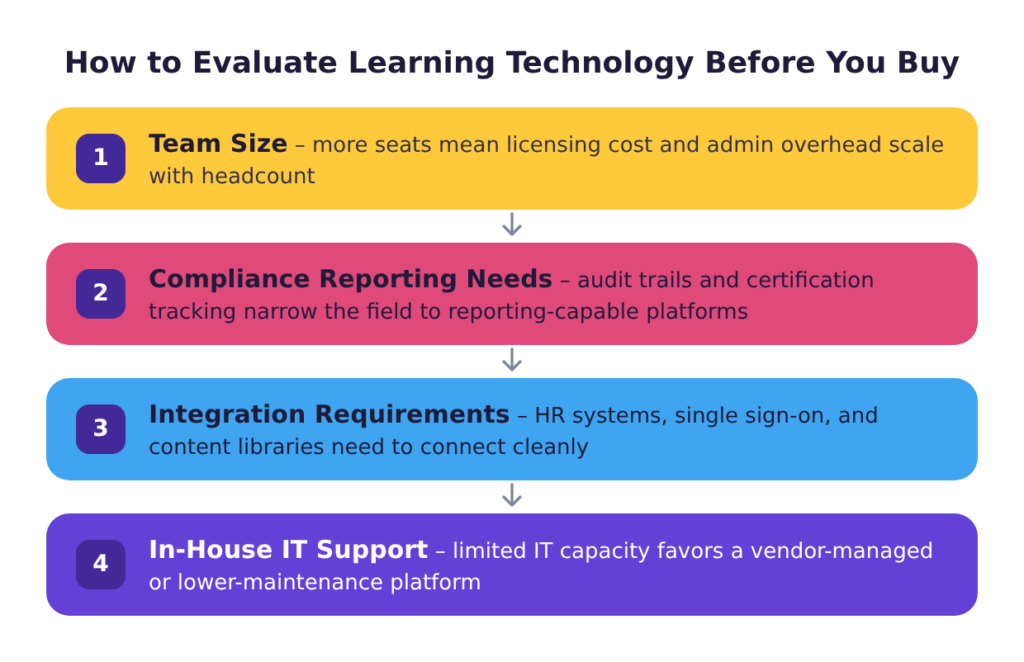
Once an organization knows which kinds of learning technology it needs, the next step is comparing vendors. The best option is usually determined by how many employees there are, how much of the workforce is frontline or non-desk, what the reporting requirements are, what systems the platform has to talk to, and how much internal IT support exists to run it.
A 60-person company with one compliance course and a 6,000-person company with role-based curricula in four languages will need different capabilities, even though the vendor demos tend to look remarkably similar.
From there, evaluating individual platforms is largely a matter of knowing which warning signs to take seriously.
A cluttered, dated interface should be a red flag. If the admin side confuses people during a demo, with a sales rep right there explaining every click, it will only be more confusing for an internal team using it alone six months later.
Rigid reporting is another warning sign. A platform that can’t be configured to answer the specific questions leadership asks usually means the admin will be stuck exporting spreadsheets by hand.
Weak integration is the most expensive problem to discover late. Without a clean connection to what’s already in place, somebody ends up reconciling accounts and completion records by hand every month.
Accessibility conformance is worth asking about too. That’s whether the platform itself, not just the courses built on it, works for someone using a screen reader, navigating by keyboard, or relying on other assistive technology. Request a signed VPAT from the vendor rather than a marketing claim.
Finally, consider whether the platform can handle the content the organization plans to put in it. For an LMS, that means interactive modules with branching and assessment scores that pass back correctly. For an LXP, it means integrating with the content sources already in use rather than locking the organization into one vendor’s catalog.
Learning Technology Implementation, Administration, and Reporting
Once the learning platform is selected, organizations should plan time for implementation. This typically involves configuring user roles, setting up reporting, and training the people who will administer the system day to day. It also includes making sure employees and managers understand what’s changing, which is where strategy and adoption matter, since a frustrating rollout undoes a lot of the platform’s value before employees and managers ever see what it can do.
If an LRS is part of the setup, one implementation decision is where it lives. Many modern LMS platforms now include an embedded LRS, which is often enough for a first step and avoids managing a second system. A standalone LRS gives more flexibility and is usually the better choice when data needs to flow to reporting tools outside the learning function.
Once it’s up and running, a learning platform requires someone to act as an administrator. This role typically includes managing accounts as people join and leave, keeping assignments current as roles change, and pulling the reports that show whether training is working. For larger organizations, it’s often worthwhile to investigate workflow automation for tasks like enrolling new hires by start date and role, triggering reminders for overdue training, and archiving content that’s gone out of date.
Finally, reporting is where a platform either earns its cost or wastes it. Most administrators learn how to produce a completion report. Far fewer learn how to use reporting and analytics to build a view that shows what matters, like whether completion improved after the onboarding sequence changed or which location is falling behind on required safety training. It’s worth asking the vendor directly to walk through the platform’s custom report builder. Most platforms can build the view leadership wants, but the admin has to know it exists to use it.
What To Do With the Training You Already Have
Most organizations aren’t starting from scratch. Almost all teams have training PowerPoints, PDF handbooks, facilitator guides, and maybe a recorded webinar or two. The first step to modernizing a training program is completing an inventory that includes what training material exists, who owns it, and when it was last updated. Not everything on that list needs to move onto a learning platform; material nobody needs to be assigned or tracked on can stay where it already lives. For whatever an organization does want assigned, tracked, or reported on, each piece falls into one of three buckets:
Strong, up-to-date content can be converted to a trackable format as-is. This could include things like a well-structured job aid, a reference document, or a recorded webinar. Content like this can be packaged into a format an LMS can launch and track, with completion assigned and recorded, without changing the content itself.
Some content needs to be rebuilt or reimagined before it’s converted. A slide deck written to be narrated by a knowledgeable person in the room is a common case: converting it to an eLearning module usually means adding narration and interactive activities so it works as an engaging, informative asynchronous course on its own. Or an overly complex job aid may benefit from a microlearning module that helps employees learn to use it well. Instructional designers can help teams match content to the format that fits it rather than defaulting to whichever one the platform makes easiest.
Finally, some content should be retired. Material that duplicates something better, covers a process that has since changed, or was built for a role that no longer exists costs more to maintain than it returns. Cutting it during the transition is far easier than cutting it after it has been migrated, assigned, and embedded in someone’s compliance reporting.
Organizations moving off an older platform may have an additional consideration to be aware of. AICC predates SCORM and still turns up in legacy systems that were never migrated. Content packaged to that standard won’t necessarily launch or report correctly in a modern LMS, so it’s worth confirming what standard existing courses were built to before assuming they can be lifted over intact.
Beyond the LMS: The Wider Learning Technology Stack
Software rollouts, frontline reference material, and live instructor-led sessions each have learning technology built specifically for them, separate from whatever LMS handles assigned courses. The questions leadership asks about training usually get answered outside it too.
Live, instructor-led training runs on its own technology, separate from whatever tracks it afterward. A dedicated virtual classroom tool gives a facilitator breakout rooms for small-group practice and live polling to check understanding mid-session. A standard video call can’t do either. That difference matters most when a session is standing in for something that would otherwise happen in person: new-hire orientation, or a compliance refresher for a team spread across locations.
Responsive eLearning design makes existing courses tablet- and smartphone-friendly, but mobile learning delivery goes further, reaching employees at the point of need instead of at a desk. That could look like a scannable QR code on a piece of equipment that pulls up troubleshooting steps, or a push notification with a short refresher six months after an initial training session. For a warehouse or field crew that’s rarely at a computer, that’s often the only realistic way training reaches them at all.
Digital adoption platforms (DAP) are newer and less familiar, but they fill a gap that has long been missing in most learning tech stacks: in-app guidance that walks an employee through a new software tool step by step, in the moment they’re using it. They pair with software simulation modules, which can serve as the initial orientation while the DAP supports people applying what they learned day to day.
Organizations can also combine training data with business intelligence tools to see how training connects to results the LMS doesn’t track on its own. A distribution center pairing completion data with safety-incident and turnover numbers can see whether the sites with the highest onboarding completion also have the lowest injury rate. No LMS dashboard answers that by itself.
Final Thoughts
Plenty of organizations already have a learning platform. Fewer know whether it’s the right kind for what they’re trying to do, or what else is out there that would do it better. That’s the question worth asking before the next renewal or purchase.
Those decisions are easier to make alongside someone who has built content on the other side of them. Check out our custom eLearning development services to see how we build for the platforms you’re already running, or schedule a meeting with one of our consultants to talk through your current stack, an LMS you’re weighing, or whether an LXP would fit your organization better.