
Learning and Development Strategy: How to Build a Learning System Instead of a Course Library
See your whole training system, find the gaps, keep it current
| September 4, 2026 | Learning Program Strategy, Workplace Learning Strategy |

In this article:
Somewhere in your LMS is a course about an operating system your company adopted in 2019. Fourteen people completed it, the manager who asked for it left two years ago, nobody has opened it since, and no one is sure whether any of it is still accurate. That’s what happens without a learning and development strategy to keep the library current.
Done well, a learning and development strategy keeps training tied to what the business actually needs from people. Most strategies form the opposite way: request by request, until the training function is a pile of disjointed modules and job aids that employees have to figure out for themselves.
A strategy is what connects those pieces. It ties training to outcomes that matter, decides what gets funded first, and puts someone in charge of keeping the whole thing current.
Key Takeaways
- Most organizations can't say, capability by capability, how complete the support behind a role is. The gaps only become visible once every capability is checked against what's backing it up.
- Every capability needs a named owner, usually someone outside L&D, since whoever runs the underlying process is the first to notice when it changes.
- A system built almost entirely from formal courses leaves most learning unsupported, since most capability develops on the job and through other people. The 70-20-10 model is a rough picture of that balance.
Why a Learning and Development Strategy Matters
Piecemeal training tends to produce the same symptoms. A supervisor re-explains the same procedure every few weeks while a module covering it sits untouched in the system. Two departments build competing onboarding tracks without knowing about each other. Employees say their assigned courses never cover the things they need help with.
Each of those resources got built without anyone thinking about how it connects to everything else. Content went out without a clear idea of what skill it was supposed to support, so there was no way to tell whether it worked. Nobody owned the library, so it aged. The data existed, but it answered attendance questions while leadership was asking performance questions.
A corporate learning strategy replaces the request-by-request firefighting with a view of the whole: what the business needs, what’s already there, and which gaps are worth closing first.
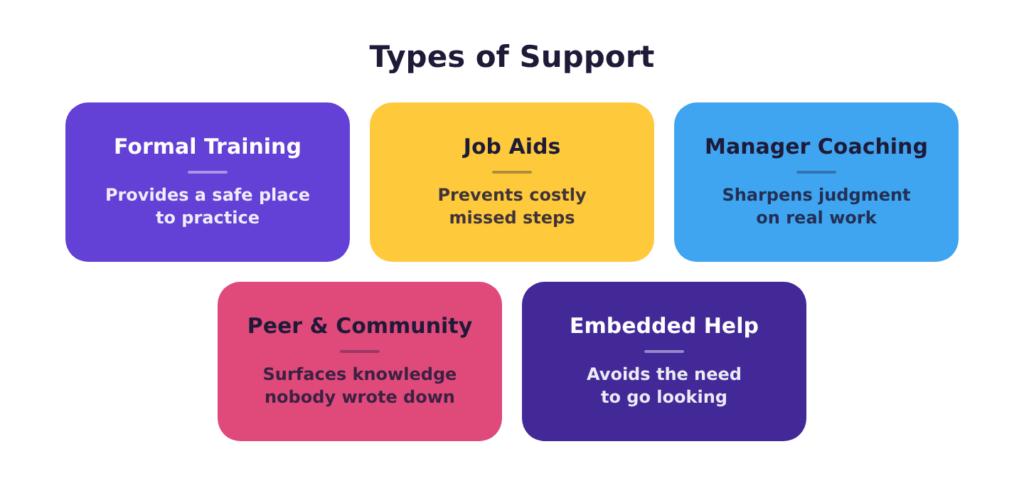
Types of Support
A learning system is everything an organization provides to help people do their job well: training, reference material, managers who reinforce it, coworkers who explain the parts nobody wrote down, and help built into the tool itself. Most of those pieces probably already exist in your organization. What’s usually missing is a strategy for how each gets used and whether every important job function has a balanced set of support behind it.
The right type of support depends on what employees need to do with the information and how complex it is:
- Formal training is for when a whole population needs the same information, or when practice without consequences would help. De-escalation and emergency response are the clearest cases: nobody should be learning either one live. It can take the form of eLearning modules, microlearning, or an instructor-led session.
- Reference and job aids are for the moment of doing. A checklist or decision tree can outline procedures nobody needs to memorize: tasks performed a few times a year, long sequences with a fixed order, and anything where a missed step is expensive. They’re also the cheapest correction when a process changes, since updating a one-pager is much faster than building a whole course.
- Manager coaching is for reinforcement and calibration. A course can rehearse judgment with the stakes removed, but reading a live situation, like an escalated customer or the decision to stop a production line, only gets sharp through observation and feedback on real work. Coaching is also what makes the other types of support stick, because a manager who knows what the training covered can reinforce it while the work is happening.
- Peer and community support is for tacit knowledge: the workarounds, context, and judgment calls that live in people’s heads. This kind of learning already happens informally in every organization, but there are formal channels that make it deliberate, like assigning a peer mentor to new hires, running a community of practice, or giving your experts a channel and the time to answer questions.
- Embedded help is guidance inside the tool at the moment of use. Tooltips and in-app walkthroughs are the high-tech version of this, but a paper template with the structure already built in falls into the same category. It’s the strongest option anywhere the task follows a fixed structure, whether that’s a piece of software or a printed page, because it removes the need to go looking for support. Its limit is scope, since it can guide someone through a workflow but can’t explain why the workflow matters.
Combining several types of support is standard practice for well-built training, and most skills need it. Capabilities that need conceptual understanding lean on formal training plus manager reinforcement. Procedural, low-frequency tasks lean on reference and embedded help. Transitions like onboarding or moving into a management role need something in nearly every category.
Why Formal Training Alone Falls Short
Most organizations lean heavily on formal training, and the 70-20-10 model explains why that often falls short. McCall, Lombardo, and Eichinger developed the model at the Center for Creative Leadership from a 1996 survey of roughly two hundred executives describing what had shaped their own careers. It holds that roughly 70% of workplace learning comes from doing the work itself, 20% from other people through peers, coaching, feedback, and observation, and 10% from formal training.
While this ratio is a rough picture rather than a precise measurement, the balance it points at is still useful when planning a learning and development strategy. Other research makes the same case independently: a meta-analysis of eighty-nine studies covering more than twenty-four thousand people found that whether training reaches the job depends heavily on what happens after the course, with supervisor support and the surrounding transfer climate among the strongest predictors.
Formal training still matters. A well-built course, built through a rigorous instructional design process, is a scalable asset that can do a lot of good and often lays the foundation that people need. But a skill learned in a course and never supported again is usually forgotten or never fully mastered, no matter how good the course was. That’s why a course with good reviews doesn’t necessarily end up changing performance. The course worked, it was just never supported beyond the initial sitting.
The question worth asking about any capability is whether anything backs that training up once people are on the job. Answering that for a whole organization means listing every capability a role depends on and checking what supports it, which is what a coverage map is for.
Seeing the Whole System: The Coverage Map
You can’t evaluate a learning system by looking at courses one at a time. You need the whole picture on one page, and a coverage map is how you get it.
Down the left side, list the capabilities the business or a specific role depends on, along with the ones it’s about to need. These should be things people have to be able to do, such as onboard a new client, run a lockout-tagout procedure, handle an escalated complaint, or close the month. Across the top, run the five types of support.
Building the coverage map the first time goes faster with someone who has built one before, and it should include stakeholders from various departments and levels (e.g., managers and frontline employees) in the room, so you get a complete picture of what exists and what employees know about and use. If a tool exists but nobody uses it, it requires a conversation to figure out why.
You’ll fill each cell with the name of the support that exists. A cell counts as filled only when three things are true at once:
- the support exists,
- the people who need it know it exists, and
- they can get to it when they need it.
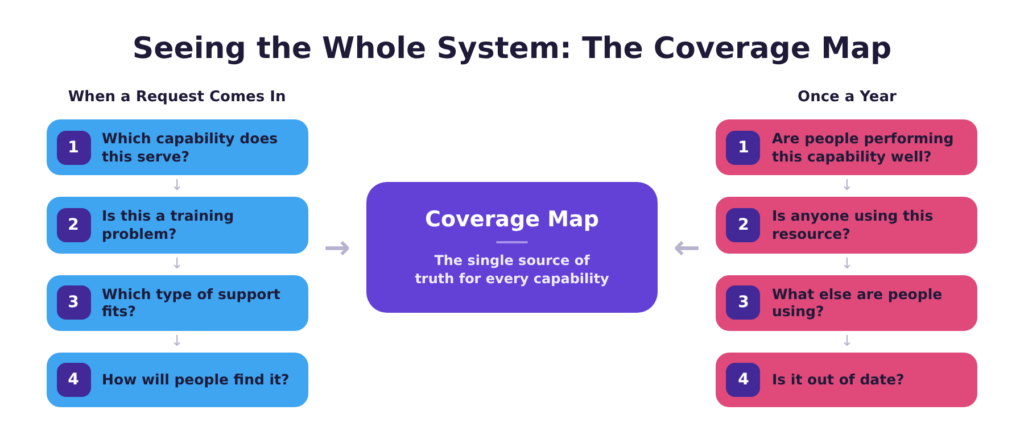
Once you build the coverage map, it should become the single source of truth you consult each time you consider a new support in your learning and development strategy.
The first pass at the map for one role, a customer support specialist, might look like this:
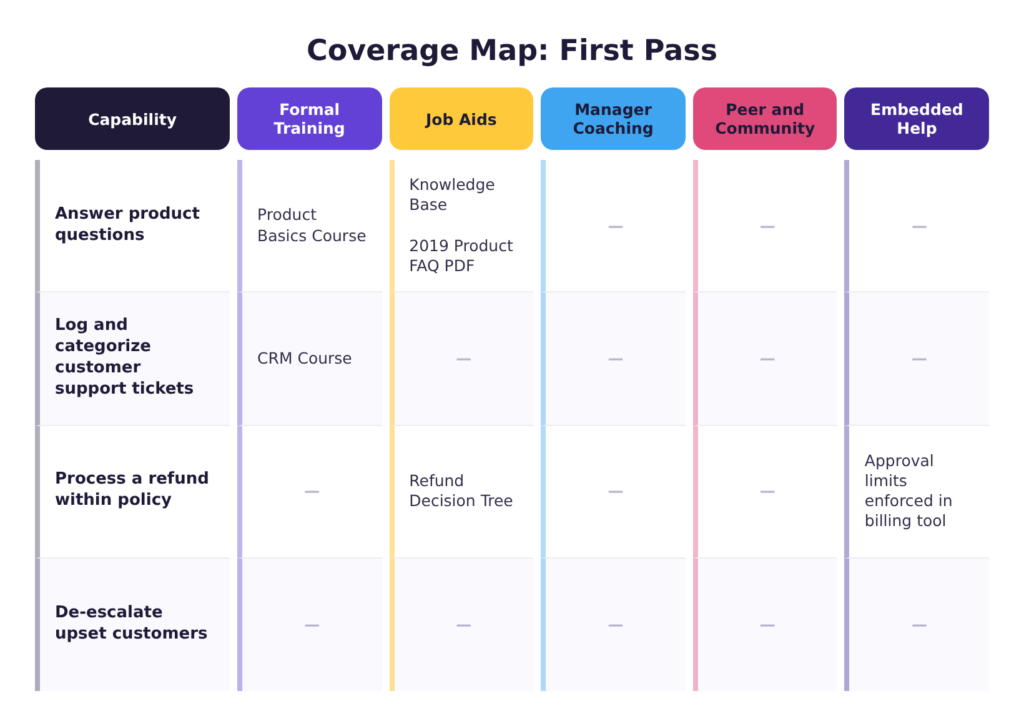
Once the grid is finished, look for patterns in how the rows and columns fill in:
- Empty rows are skills gaps with nothing behind them.
- Rows with only one column filled should be reviewed to see whether the capability’s complexity warrants additional support. A simple skill may be fine with a job aid alone, but most need more than that. When one column is filled, it’s almost always formal training, and a course with no reinforcement, no reference material, and no manager follow-through is usually ineffective.
- Crowded rows are worth auditing. Check that each asset is still accurate and that each one serves a different moment of need, rather than making people search across several places to find help.
- Rows where the support doesn’t match the moment should trigger a rebuild. For example, a task performed twice a year that’s backed by a 45-minute course is a candidate for a one-page checklist that would do the job at a fraction of the cost.
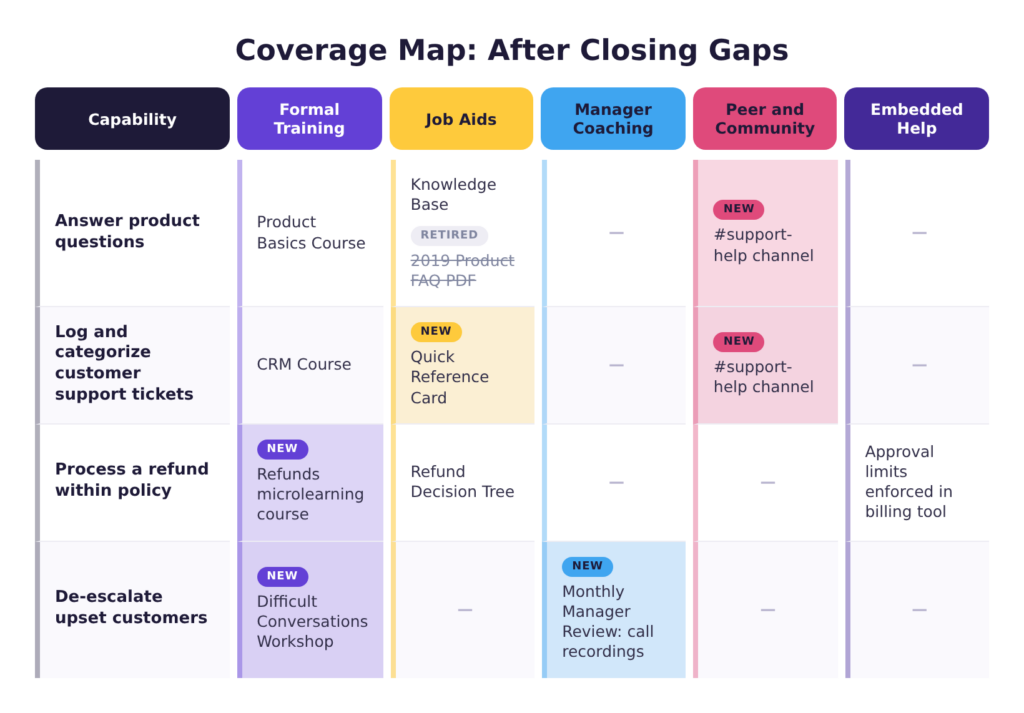
Acting on those findings means both directions at once: retiring resources that no longer earn their place and adding support where a capability has none. Some cells get emptied, others get filled, and a row that fails the moment-match check gets swapped for something lighter.
The updated version of the sample above may look like this:
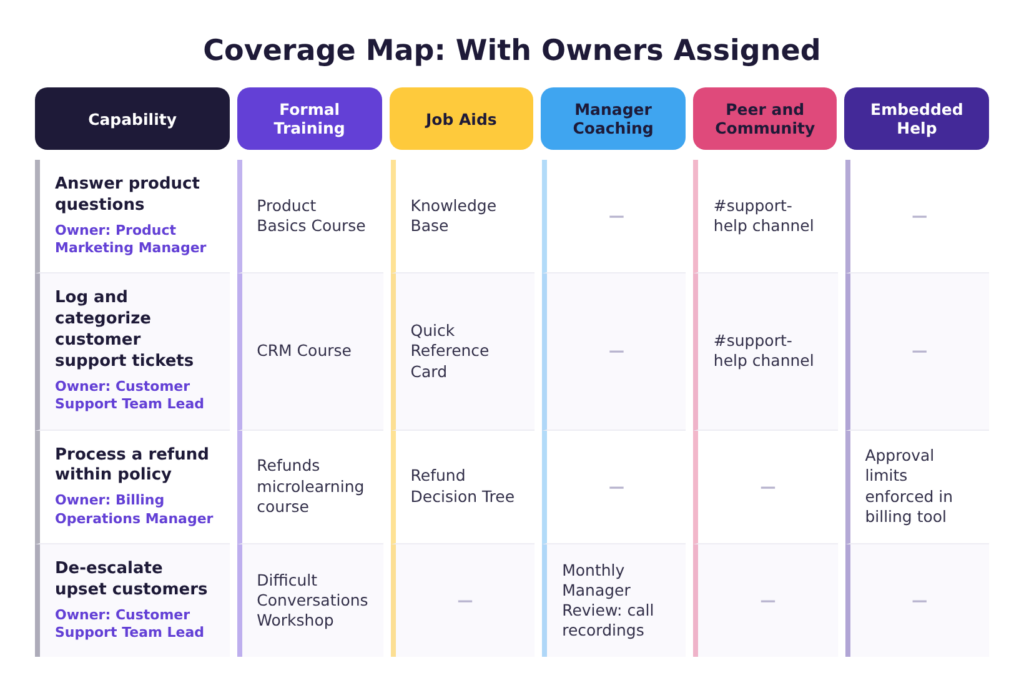
The map isn’t finished once the cells are filled. Every row also needs a name attached to it — an actual person, not a team. Nobody notices when team-owned content goes stale, because it was never any one person’s job to check. The best person to own a row is usually the same person who owns the underlying process. They’re the first to notice when a process changes, when a resource isn’t helping, or when their team is struggling.
In the customer support specialist sample, the owners of each row have been added to each capability:
You can start from a Coverage Map Template that walks through identifying capabilities, listing existing support, applying the three-part fill test, and reading the patterns.
Running the System
A map only stays accurate if there’s a process for checking it. That process runs on two cycles: one that kicks in whenever a new request comes in, and one that runs on a fixed schedule whether anyone’s asked for anything or not. L&D owns the map and keeps both cycles running on time, but the actual judgment calls belong to row owners, since they’re the ones closest to whether a capability is still working.
The Intake Check
A request from someone, whether that’s employees or management, often triggers training or support. Requests are usually where duplication starts. Somebody needs something, nobody checks whether it already exists, and six months later there are two versions of it with different content. Before anything new gets built, the capability’s owner needs to ask four questions:
- Which capability does this serve, and what’s already there? If the capability isn’t listed on the map, either you’ve found a capability nobody had named yet or the request isn’t about capability at all. The most common outcome is discovering that something already exists and needs an update or a better rollout instead of a replacement.
- Is this a training problem? Somebody who can already do the task and isn’t doing it has a problem training won’t solve. More often it’s about something else, like incentives, a process nobody communicated, or a tool that complicates the life of the person using it. By diagnosing the real performance problem you can often improve performance much more than a course would.
- Which type of support fits? Requests often arrive as ‘we need a course’ because that’s the vocabulary people have, but a course is only one of five options. The owner’s job is to look past the request to what’s being asked for, then match that to the type of support that fits the moment.
- How will people find it? No request should be approved without a rollout plan.
Annual Check
The intake check ensures that all new content has a job and is effective, but it doesn’t keep the system current. At least annually, owners should look at what’s supporting each capability they’re responsible for and decide whether to leave it, update it, or retire it.
Four questions inform that decision:
- Are people performing this part of the job well? If not, consider the range of factors that can hold performance back — feedback, incentives, tools, environment, and training gaps. If training is confirmed as a real factor, consider ways to improve performance with better supports.
- Is anyone using it? If a capability comes up regularly but its support sees little use, either the rollout needs to be fixed or the resource does.
- What else are people using instead? When a team has built its own cheat sheet, the official material has already been retired in practice, and the grassroots version is often the better starting point for a replacement.
- Is the capability or the content out of date? When expectations change, the associated supports need to be updated to match, or retired if they no longer apply. Content can also fall behind without the job changing at all, when a newer format or current thinking on how training gets built would make a better version possible.
An annual pass at the row level works for most organizations, with off-cycle reviews triggered by operational changes such as a system migration, a reorganization, a regulatory change, or a product launch.
What Makes a Learning and Development Strategy Work
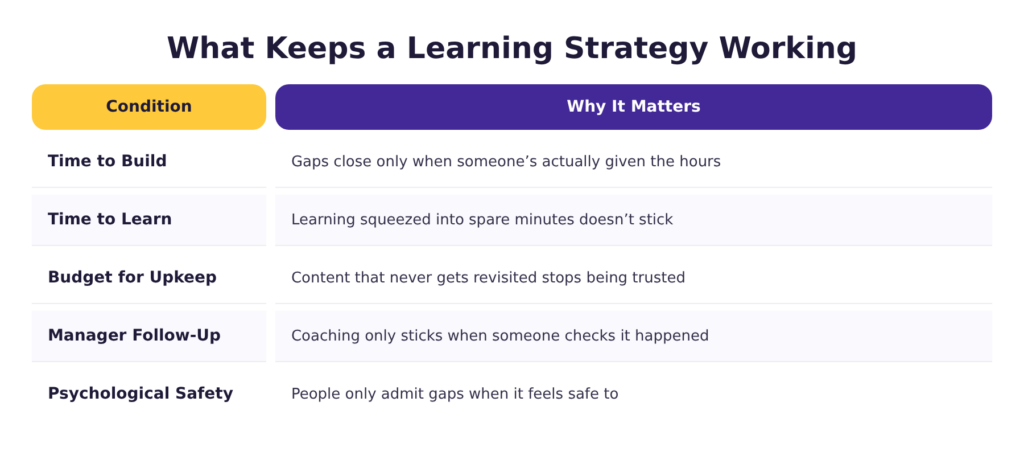
Even the best coverage map can’t close a gap by itself. Time, money, the kind of culture where people can admit they don’t know something all have to be in place before anything on the map actually gets fixed.
Time to build has to come from somewhere. Gaps stay open when the person who would close them has a full-time job doing something else. When subject matter experts need to write a checklist on top of their existing workload, the checklist gets pushed to next week then forgotten. The hours have to come from a named source before the work starts: a percentage of someone’s week, a temporary reassignment, or outside help.
Time to learn disappears the moment it’s treated as a favor instead of work: people asked to finish a module between calls will click through it as fast as they can. When managers protect that time, performance improves and so does retention. The obligation runs both ways, though. The organization owes people the time; whoever builds the training owes them the shortest path to the skill. Training that takes an hour to explain what a two-minute walkthrough could show wastes time people already gave up something else for — and they check out accordingly.
Money for builds tends to stop flowing once something ships. But every asset built is also something someone has to review, update, or eventually retire. A training budget has to cover that upkeep, not just the build. Skip it, and a library turns into something people stop trusting.
Managers follow through is what coaching and peer support both depend on, and follow-through is easy to let slide. A supervisor can approve the training, sign the completion, and never bring it up again. Nothing catches that. What usually decides whether the follow-up happens is whether anyone above the manager asks about it, and whether it shows up in their own review.
Psychological safety is what manager and peer support both rely on, since neither works if people can’t admit they don’t know something. In organizations where that’s risky, the informal channel goes underground and the knowledge stays in individual heads, which is a retention problem in addition to a training one.
You can’t build your way out of any of these conditions. Training won’t move engagement or performance on its own when the cause sits somewhere else, so a first pass at the map that turns up a problem in this category is worth a conversation with leadership about what changes might need to take place.
Where to Start
Getting a learning system organized for the first time doesn’t take a perfect plan, just a few good starting choices.
- Pick one role to map, not the whole organization — ideally one where the pain is already visible: high turnover, ineffective onboarding, or a process people keep getting wrong.
- Get the capabilities from the people doing the work, not the job description. A list built from job descriptions describes the role as it was written. A list built from a conversation with two people in the role and their supervisor describes the role as it exists.
- Start with a gap that’s easy to close, not the one that feels most urgent. Rows that touch everyone and take a year to move feel urgent, but that makes them terrible first attempts. Look for a row where somebody is already tracking a number, where the fix is a checklist or a conversation rather than a new course, and where nothing else is competing.
In-House or Outside Help
Building the map, closing the gaps, and keeping the whole thing current can be a large task. Deciding whether to keep that work inside or bring in help comes down to what’s constraining you.
Doing it internally works when someone has both the time and the standing to do it. Building the map means asking department heads what their people are responsible for, and asking managers to take on coaching they may not have signed up for. That’s easier for someone with an existing relationship to those leaders than for a new hire who’s only six weeks in. The constraint is usually capacity. Completing the map competes with whatever that person is already doing, and it’s the kind of work that slips when there are other deadlines.
Bringing in outside help works when the constraint is expertise or bandwidth rather than authority. An outside partner has built these before, has seen how the rows fill in across different organizations, and can tell you which gaps are worth closing and what the support in each column should look like. Somebody inside the building still has to hold the ultimate responsibility: convene the stakeholders, back the decisions, and be the one whose name goes on the rows. An outside partner can hand you the map and the plan; they can’t carry that part.
Final Thoughts
The outdated course is still sitting in your LMS because nothing about the way it was built ever made anyone responsible for taking it down. That’s the difference a corporate learning and development strategy makes, and you don’t need the whole thing at once to get there. Pick one role, list what the people in it have to be able to do, write down what supports each of those things today, and assign an owner to every row.
That’s a learning system at its smallest: a picture of what the work requires, an honest account of what backs it up, and a person responsible for keeping both current. Building a full training program is the same steps at a larger scale.
Building one of these from scratch, or straightening one that’s grown lopsided, is the work we do every day. Review our instructional design consulting services to see how we can help or schedule up a free consultation with one of our instructional designers to get individualized advice for your organization.