
eLearning Development: A Practical Guide for Organizations Building Digital Training
Inside the design and production choices that result in high-quality digital training
| September 17, 2026 | Tags: Authoring Tools, eLearning Development, Interactive Learning Techniques |

In this article:
A logistics company spends six weeks and most of a quarter’s training budget on a new onboarding module, then watches new hires click through it in fifteen minutes and forget half of it by their second shift. eLearning development tends to go wrong in undramatic ways: a format that doesn’t fit how the audience works, a script written by someone who has designed training for a room but never for a screen, or a course nobody opens again after launch. By the time the data says something is off, the organization has already spent the money.
Key Takeaways
- “eLearning” isn’t one format. Live sessions, self-paced modules, blended programs, and microlearning are separate choices, and the best format depends on what people need to do with the training.
- A bigger budget doesn’t buy a better course. Two builds at the same price can have completely different impacts on employee performance depending on how well they’re designed.
- Custom development runs on checkpoints. Stakeholders review a design document, then storyboards, then a working prototype, so the course can be shaped as it’s built.
Why Organizations Choose eLearning
Digital training earns its place in a broader learning and development strategy for practical reasons. It scales in a way a live session can’t: a course built once can reach ten people or ten thousand without adding an hour of facilitator time.
It also reaches people where they already are. A field technician can pull up a short module between service calls. A nurse coming off a night shift can finish a compliance course from home instead of staying late for a classroom session. When training fits into the shape of someone’s day instead of competing with it, people show up ready to engage instead of counting down until it’s over.
Digital training is also usually cheaper than live instruction at scale. A live workshop costs about the same to deliver the tenth time as the first, since the room, the travel, and the facilitator’s hours don’t get cheaper with repetition. The Association for Talent Development’s own research bears this out at the industry level: between 2024 and 2025, the average organization’s per-employee training spend fell by nearly a third even as the average number of training hours delivered per employee rose, a shift ATD attributes partly to organizations moving more training online and off the road.
Good eLearning programs also provide consistent quality. Twelve supervisors delivering the same onboarding session produce twelve versions of it, shaped by whoever is having a good day, running behind schedule, or skipping the parts they find boring. One recorded module produces one version, every time, whether it’s the first person who takes it or the five-hundredth.
Finally, eLearning now supports experiences that used to require someone in the room. The objections leaders raised when eLearning first arrived, grainy video and click-next slides, describe a generation of tools that newer platforms have since replaced. Modern platforms support branching scenarios, embedded video, and interactions that respond to what a learner does rather than just how fast they click through.
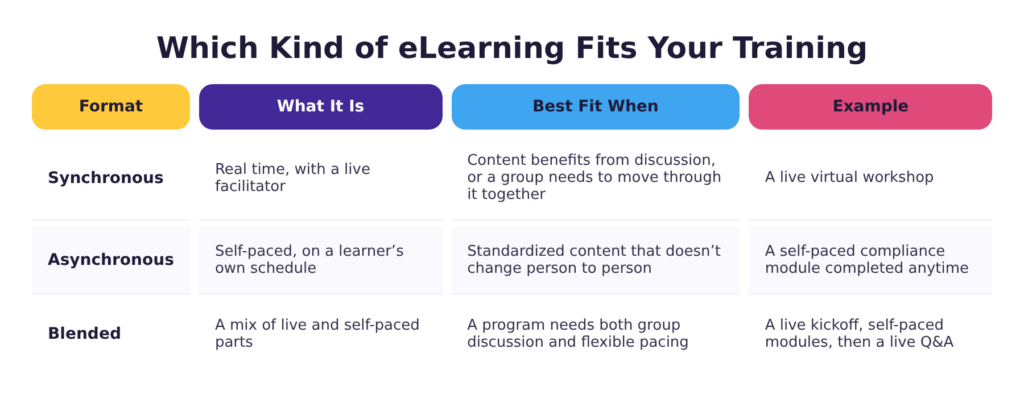
Which Kind of eLearning Fits Your Training
“eLearning” isn’t one thing. Once you know digital training is the right format for the job, the next decision is what form it should take.
Synchronous eLearning happens in real time: a live virtual workshop, a webinar, a facilitated online discussion. It keeps the immediacy of a classroom (questions answered on the spot, a facilitator who can read the room, etc.) without the travel. It’s the best fit when content benefits from discussion, or when a group needs to move through material together.
Asynchronous eLearning is a self-paced module a learner completes on their own schedule. It trades real-time interaction for flexibility, which usually makes it the better option for standardized content that doesn’t change person to person such as compliance training, onboarding, or product knowledge.
Many organizations opt for blended learning rather than picking one. A new-hire program might open with a live orientation session, move into self-paced modules for the bulk of the content, and close with a live Q&A once people have questions worth asking.
Microlearning is a different kind of decision. Synchronous and asynchronous are about when training happens; microlearning is about how much any single piece should try to cover. A five-minute module that reinforces one skill right before someone needs it does a different job than a forty-minute course. It can play several roles: a standalone lesson on something simple, reinforcement after a longer course, a reminder before a task people rarely perform, or a refresher months down the line.
Inside the eLearning Development Process
Picking the right form is step one. A synchronous or asynchronous course can still fail if the experience inside it gives a learner nothing to do, which is where design choices start carrying weight.
Think of building a course the way a production company thinks about a film. The authoring tool is like the camera. The camera was never what made a movie worth watching. That comes down to a well-written script, a storyboard that sets the right mood, and a few hundred decisions about what the audience sees and when. By the time the camera turns on, most of what matters has already been settled.
eLearning works the same way: after those design decisions are made, the rest is production, which is skilled work with a plan already behind it.
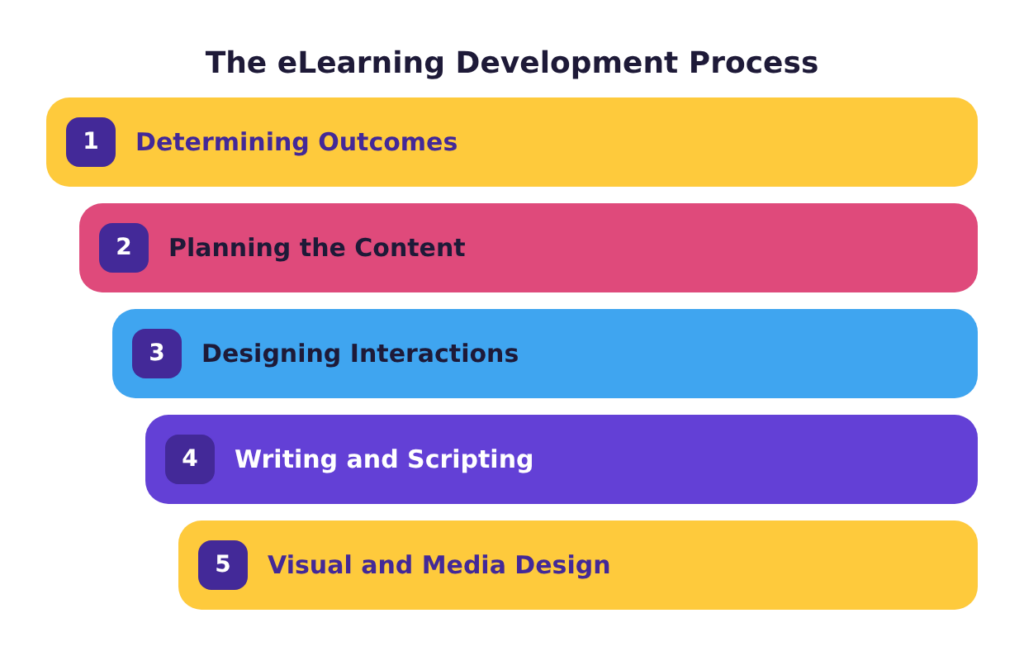
Determining Outcomes
eLearning development starts with determining what people should be able to do when the course is over. It sounds obvious, but it’s the step most courses skip. Someone collects topics, organizes them into modules, and delivers them, and nobody stops to ask whether the course will change what anyone does afterward.
Take product training. Built to cover the topic, it walks a new sales rep through the whole catalog, feature by feature. Built with performance in mind, it teaches the six questions customers ask most and how to answer each one. Both versions take about the same amount of effort, but only the second one will help a rep on a call.
Planning the Content
With the outcomes settled, the content needs a plan: source material gathered, the flow outlined, decisions made about what stays and what goes. This is where an instructional designer (ID) and a subject matter expert (SME) work closely together to turn the SME’s expertise into training content. The SME knows the material, but sorting it into what a learner needs and in what order is the ID’s job.
The most important decision in this stage is where a learner needs practice instead of information. That decision sets up everything that will be built.
Designing Interactions
The most powerful thing a course can offer is a safe place to practice a new skill. Good eLearning design gives people something to do rather than something to sit through, in pieces small enough to retain. Instructional designers lean on cognitive load theory and a set of interactive eLearning techniques to get people to the end of a course able to do something they couldn’t before.
- Scenario-based learning puts a learner inside a realistic situation and lets their choices lead somewhere. Good calls end well. Poor ones, less so. A warehouse safety course built this way might drop someone into the middle of a near-miss and ask what they’d do next, instead of restating the rule they’re supposed to already know.
- Branching scenarios extend that idea across multiple paths, so the course responds to what a learner chose. A customer-service course might let a rep’s response to an angry caller lead to a resolved call on one path and an escalated one on another, then walk them through what recovering from that second path looks like.
- Gamification borrows mechanics from games (points, levels, friendly competition) to give learners a reason to keep going. A sales-onboarding course might award points for correctly matching objections to responses, so climbing the leaderboard requires knowing the material. The mechanics have to relate to the content and reinforce the skill being taught; when points are only there to make a content-heavy module feel less boring, learners see through it and disengage.
- Immersive learning, meaning VR and simulation-based training, puts a learner inside an environment too expensive, too dangerous, or too logistically complicated to recreate in person. For example, a flight school can let a trainee respond to the same equipment malfunction as many times as it takes, without anyone leaving the ground.
Matching the technique to what a specific module needs to accomplish is one of the judgment calls instructional designers learn to make.
Writing and Scripting
Scriptwriting is where a course takes shape. Pacing and tone are the focus at this stage, and the two don’t always show up on the page: a paragraph that reads fine silently can sound rushed once it’s narrated over a slide, and a sentence built for a bullet point can sound like something nobody would say out loud. A script written well doesn’t just deliver information, it sounds like an experienced colleague walking someone through something they need to know, patient enough to be pleasant to listen to and clear enough that the material lands.
Visual and Media Design
Multimedia is where a course either earns its production budget or wastes it. Multimedia learning is the field that studies how people learn from words and pictures together. One of its clearest findings is that more isn’t automatically better. Video, animation and audio are only worth adding when they do work a simpler format couldn’t. For example, a short animation can show a process more clearly than a paragraph of instructions. Adding a multimedia element just because the budget allows it tends to slow down a course without making it more effective.
Building to a Standard
Two things keep a course consistent from one build to the next: the tool it gets built in and the template it starts from. A team that locks in both before building the first module can move through every module after that without stopping to make the same decisions twice.
Authoring Tools and Templates
Authoring tools turn a script and a storyboard into a course. With a slide deck, a learner watches. With an authoring tool, a learner clicks, chooses, answers, and branches through content that responds to what they do. Articulate 360 has become something close to the industry standard for this work, and it comes with two main tools: Storyline 360 for full interactive control and Rise 360 for speed. Weighing the pros and cons of Storyline vs. Rise is also an area where an instructional designer can offer insight.
Templates and design standards matter most for organizations producing a lot of content. Once a team settles on a screen layout, an interaction pattern, and a visual style, nobody has to rebuild those basics on every new course. That’s what rapid eLearning development means in practice: designers start from a proven structure instead of a blank screen.
Designing for Every Learner
Device, ability, and language or region are the three places a course most often loses part of its audience. Each one is cheap to design around from the start and expensive to fix after launch.
Building for Any Device
Responsive design, which means building a course so it works as well on a phone or tablet as on a laptop, has moved from nice-to-have to close to mandatory as more training gets completed away from a desk. A retail associate finishing a module on the sales floor between customers needs it to work just as well on her phone as on a laptop.
Building for Any Ability
A course that depends on hearing narration, seeing color-coded feedback, or using a mouse locks out any employee who can’t do one of those three things. Captions, alt text, color contrast, and keyboard navigation are far cheaper to build in during production than to retrofit after launch, and authoring tools only catch some of it automatically. It’s worth understanding what’s involved in accessible eLearning and building those decisions into any new course that gets produced.
Building for Any Region
Organizations that work internationally should consider language and region during the build. Localizing content for a different language or cultural context is far simpler when a course was built with it in mind. This might mean leaving room in the layout for text that expands in translation and narration kept separate from what’s on screen. When it’s handled after the fact, it usually means rebuilding the course.
What You Get Along the Way
Custom eLearning gets built in stages, and each one produces something a client can look at. That matters for two reasons: it’s how a project stays on course, and it’s the only way to catch a problem while fixing it is still easy.
The design document comes first. It lays out the outcomes the course is built around, what content is in and out, how it’s sequenced, and where learners will practice. Nothing has been built yet, which makes this the cheapest possible place to make updates.
Storyboards turn that plan into a screen-by-screen map: what appears on each screen, what the narrator says, what the learner is asked to do, and where the course branches. Storyboards are usually where a SME catches a technical inaccuracy, because it’s the first time the content appears in a more complete form.
A prototype is a few screens built in the authoring tool with real content in them. It gives stakeholders something concrete to react to, which surfaces problems worth catching before the full build starts: branding that isn’t quite right, a different font or layout preference, or an interaction that isn’t what someone pictured.
Review cycles are scheduled checkpoints where feedback is collected on a working version of the course, usually a first full draft and a near-final version. Each round allows stakeholders to go through the module the way a learner will, watching every slide and clicking every path, to ensure everything was built as expected.
Staged deliverables put feedback in front of you while the fix is still easy, rather than saving one review for the end, when the same note can mean a rebuild.
Maintaining and Modernizing eLearning
A high-quality eLearning library requires regular maintenance. Products change, policies get updated, and processes get revised, any of which can mean a course becomes obsolete or incorrect.
Organizations should plan ahead to make updates as painless as possible. Keeping source files organized, choosing a voiceover approach that can be re-recorded a line at a time instead of start to finish, and building courses in modular sections instead of one unbroken sequence are all strategies that can streamline the maintenance process.
For existing content libraries, some content has likely aged out entirely. Flash-based modules that no longer run in modern browsers and legacy SCORM packages that predate current standards need a rebuild rather than a patch.
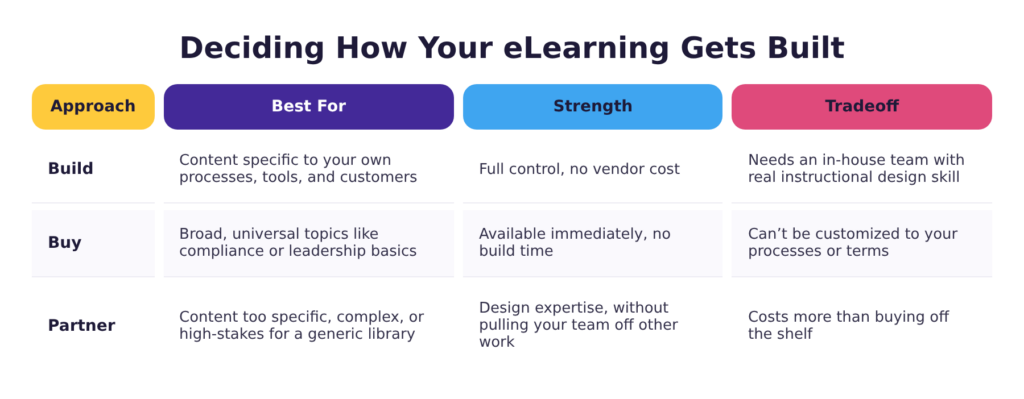
Deciding How Your eLearning Gets Built
Once an organization knows it needs eLearning content, it still has to decide how to get it built.
Building internally makes sense when the content is specific to your own processes, tools, and customers — the kind of material a vendor library will never have because it doesn’t exist anywhere outside your organization. It also depends on having a team with both the bandwidth and the instructional design skill to do it well; a subject matter expert who knows the material cold isn’t the same as someone trained to structure it into a course that teaches.
Buying off-the-shelf works for broad, universal topics like compliance basics or general leadership skills, where one organization’s version of the content looks much like another’s. It’s available the day you buy it and gives a solid baseline view of a topic without any build time at all. The tradeoff is that it can’t be customized to your own processes or terminology, so employees sometimes have to mentally translate a generic example into what it means at their company.
Partnering with a developer sits between the two. It costs more than buying off the shelf, but it’s the option for content that’s too specific, too complex, or too high-stakes for a generic library. It gets there without pulling an internal team off other work or asking them to do instructional design they haven’t been trained in, which matters most when the timeline is too tight for anyone to learn that skill on the fly.
There’s no universal right answer. It comes down to what an organization needs and what it has the internal capacity to build well. For organizations who want to go the partner route, the next question is usually what it costs.
Understanding the Investment in eLearning
What eLearning development costs, when you’re hiring someone to build it, comes down to scope: how much content, how interactive it needs to be, whether it involves custom video or animation, and how many rounds of stakeholder review are built into the schedule.
A mostly text-and-image course costs less than a fully branched scenario with custom illustration and voiceover. But it also leaves the learner reading about the job instead of practicing it. Most corporate eLearning development projects incorporate a bit of both.
What a quote doesn’t show is where a course’s effectiveness comes from. An eLearning development partner brings the design expertise: the planning, the sequencing, and the calls about what a learner needs to practice rather than read. Two courses can cost about the same to build and still have completely different effects on learner performance after the fact.
When you’re evaluating a developer, ask when their instructional designer joins the project. Some teams bring one in at the start, to help establish what the course covers and how people will practice it. Others hand that to a project manager and bring the designer in later, to build what’s already been decided. The decisions that result in an effective training module get made early, so you want instructional design expertise in the room when they happen.
Final Thoughts
Most of what determines whether a course works gets decided before anyone opens an authoring tool. Before greenlighting a build, organizations can and should ask three things: whether the format fits how the audience works, whether the content was planned around what people need to be able to do, and whether an instructional designer was in the room when those decisions got made. Those questions prevent most of what turns an expensive course into the fifteen-minute click-through nobody remembers.
Ready to build eLearning that changes performance instead of just getting clicked through? Check out our custom eLearning development services or schedule a free meeting with one of our instructional designers to talk through what you’re building.